









Free Up Storage Space
Applies to
Tip – Get more space for free
For every published review of eWay-CRM, you get 1 GB of extra cloud storage, forever. Get your whole team involved: ten reviews mean 10 GB. Find out more on the Gigs for Review page.
Saving emails and documents to eWay-CRM takes up quite a lot of cloud space over time. In the eWay-CRM Online settings, you can see which data takes up the most space and free some up or get more.
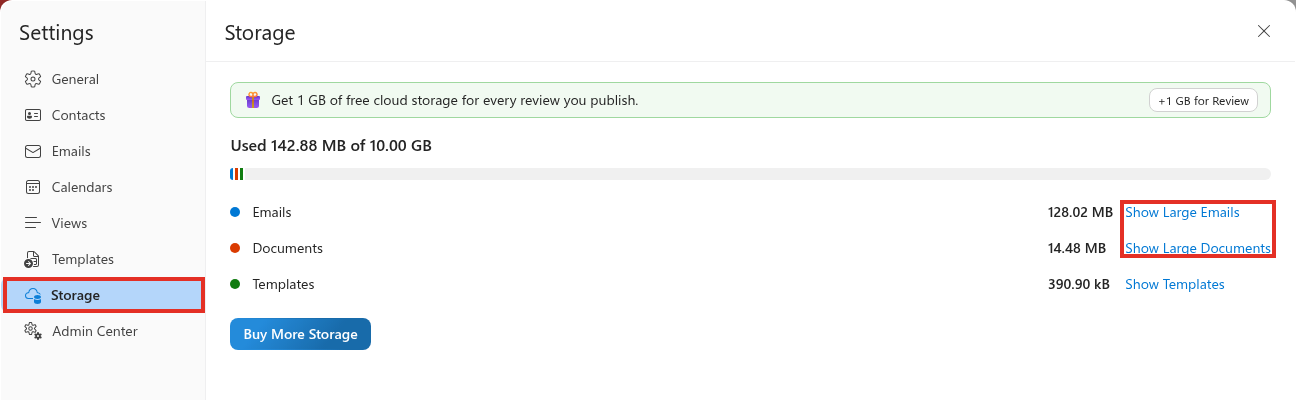
- Open My Settings > Storage. In eWay-CRM Online, you can also get there by clicking your name in the bottom left corner, selecting My Settings, and opening the Storage section.
- At the top, you’ll see how much space is used, followed by a breakdown into Emails, Documents, and Templates.
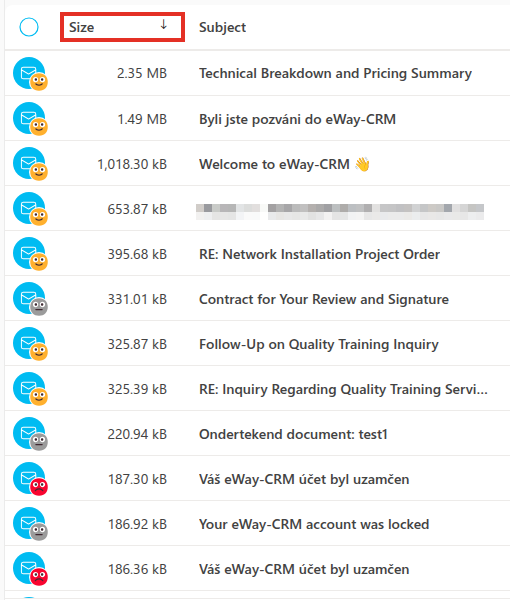
- Click Show Large Emails. A list of emails sorted by size opens in a new tab, so you can see right away what takes up the most space. The Show Large Documents link opens the Documents module.
- Delete the items you no longer need. If you don’t want to delete anything, click Buy More Storage or +1 GB for Review in the Storage section.
Was it useful?

Thank you for your feedback.