

Microsoft 365 Is Asking for Admin Consent? That's Actually Good News


When you try to connect a third-party app to Microsoft 365, you may see an admin consent request. It can feel like a roadblock.
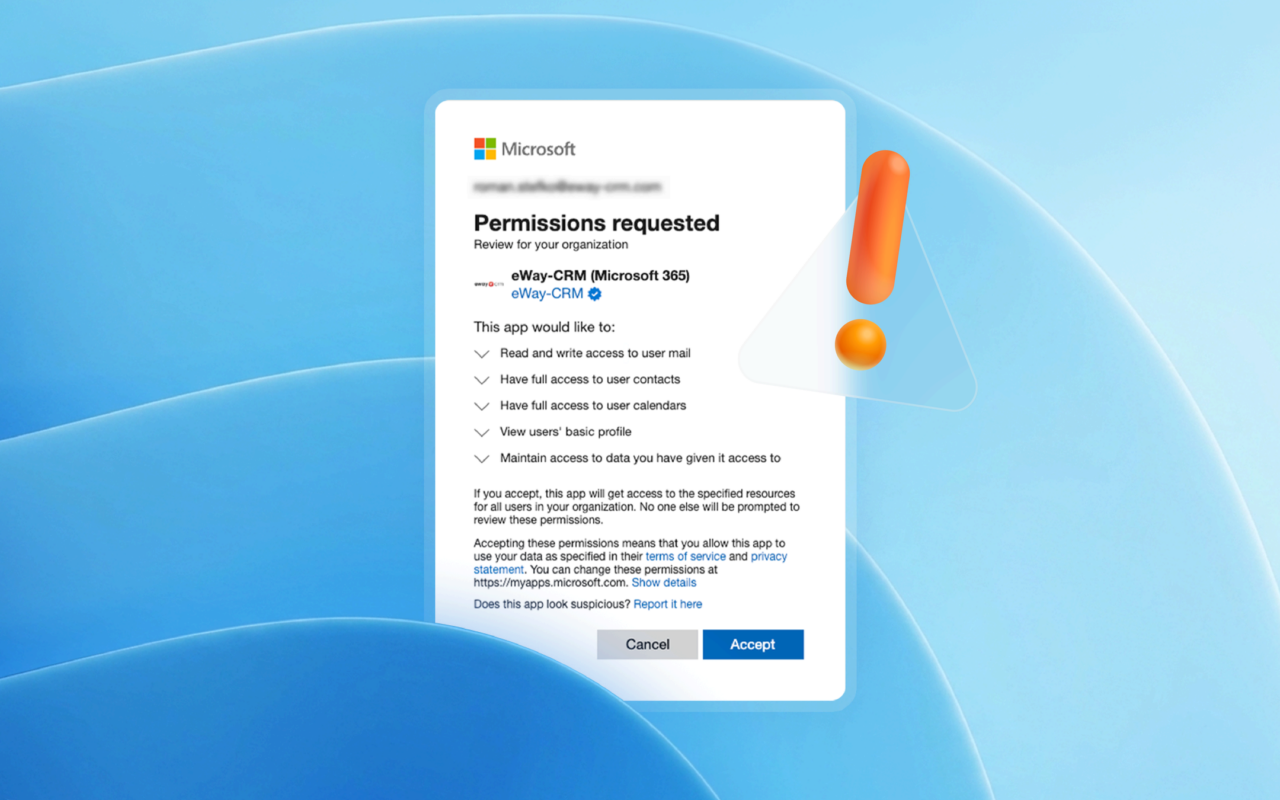
In reality, it's usually the opposite.
The request helps protect your organization's data. It also gives your IT team control over which apps can access company resources.
Table of contents:
Why Microsoft 365 Sometimes Requires Admin Consent
Admin Consent Isn't About One Specific Application
Admin Consent Is a Checkpoint, Not a Roadblock
Microsoft Is Protecting Your Organization's Data
What Does This Mean for End Users?
Example: eWay-CRM Connected to Microsoft 365
What Should You Do If You See an Admin Consent Request?
What If Your IT Administrator Is Being Careful?
Conclusion
Why Microsoft 365 Sometimes Requires Admin Consent
Imagine a common scenario.
You use Microsoft 365 and want to connect an application to Outlook, your calendar, contacts, or company files. You sign in with your Microsoft account. Expect everything to work right away but instead someone tells you that an admin must approve it.
Your first thought might be:
"Something isn't working."
But in most cases, nothing is broken.
Microsoft is saying this: The app wants access to your organization’s data. A person with the right permissions should review it first.
And that makes sense.
Business email, contacts, meetings, and documents often contain customer information, internal communications, and sensitive company data. Microsoft doesn't want applications gaining access to that information without oversight.
Admin Consent Isn't About One Specific Application
One thing is important to understand.
Admin consent is not a requirement created by a particular software vendor. And it isn't unique to any individual application. It's a standard Microsoft security mechanism used for applications that integrate with Microsoft 365 and request access to organizational resources.
Some permissions can be approved by individual users. Others require approval from an administrator. The decision depends on the requested permissions and on how your organization has set up Microsoft Entra security policies.
Admin Consent Is a Checkpoint, Not a Roadblock
The underlying concept is straightforward. Microsoft uses it to prevent users from accidentally granting sensitive permissions to applications without proper review.
The request itself does not indicate that the application poses a security risk. It means someone in charge of Microsoft 365 administration, IT operations, or security should check the requested permissions.
That's how a modern business environment should work.
An entire organization shouldn’t expect individual users to evaluate the security implications. Responsibility for that assessment typically belongs to the IT administrator.
Microsoft Is Protecting Your Organization's Data
Microsoft has spent years building Microsoft 365 around strong identity management, access controls, and data protection. And admin consent plays an important role in that strategy.
Rather than an additional administrative step, it serves as a safeguard that helps prevent applications from accessing organizational data without appropriate review and approval.
Before granting access, an administrator can review:
- The permissions requested by the application
- Whether those permissions align with the application's purpose
- Whether they comply with company policies
- Whether the application can be safely used within the organization
Trusted applications respect this process and do not try to bypass it.
What Does This Mean for End Users?
You might be thinking:
"Security is important, but why should I care?"
Because approved integrations often save significant amounts of time and reduce manual work.
Applications connected to Microsoft 365 can, with approved permissions, use data your organization uses every day. This includes emails, contacts, calendars, documents, and SharePoint files.
In practical terms, this can mean:
- Less copying and pasting between systems
- Fewer application switches throughout the day
- Better context around customers and projects
- Easier collaboration across teams
- Fewer lost details and duplicated records
- Faster work within tools employees already know
Example: eWay-CRM Connected to Microsoft 365
A good example is eWay-CRM integrated with Microsoft 365.
Many companies already rely on Outlook, Teams, calendars, contacts, and document management. eWay-CRM helps organize and connect customer information across these tools.
The goal is to bring CRM into the Microsoft 365 tools teams already use. Teams can work with CRM directly in Outlook, Teams, SharePoint, and other Microsoft 365 applications.
To make that integration possible, the application requires certain permissions.
If administrators need to review the requested permissions, Microsoft 365 displays the request.
What Should You Do When You See an Admin Consent Request?
The best approach is simple:
- Contact your IT administrator.
- Send them the vendor's documentation or setup instructions.
- Ask them to review the requested permissions.
- If everything aligns with company policies, they can approve the integration.
You can use a message like this:
Hi, While connecting an application to Microsoft 365, I received this request. Could you please review it and approve the integration if everything looks appropriate? Thank you.
If you're connecting eWay-CRM, you can also send your administrator the relevant setup guide.
What If Your IT Administrator Is Being Careful?
That's actually a good sign.
A security request simply indicates that Microsoft requires additional approval.
Administrators should approve applications only after reviewing the requested permissions.
And cautious administrator is just helping protect the organization.
Conclusion
If Microsoft 365 asks for admin consent, it doesn't mean anything has gone wrong.
It's a standard security safeguard designed to protect organizational data and ensure that applications receive access only after appropriate review.
So the next time you see it, don't think of it as something bad and fishy.
Think of it as a security checkpoint doing exactly what it's supposed to do.
FAQ
Is admin consent an error?
No. Admin consent is a standard Microsoft security feature, not an error.
Is admin consent specific to eWay-CRM?
No. Any application that requests certain permissions within Microsoft 365 may require admin consent, depending on the requested access and the organization's settings.
Who decides whether admin consent is required?
The requirement is determined by Microsoft's security model, Microsoft Entra, and your organization's configuration settings.
What should I do if I can't approve admin consent myself?
Contact your IT administrator. They can review the requested permissions and decide whether the connection should be approved.
Why do Microsoft 365 applications need permissions?
Permissions allow applications to securely work with Microsoft 365 services such as email, contacts, calendars, documents, and other business data.